How to check if ChatGPT recommends your business
Part of our series on Measuring your AI visibility. The reference guide is the guide to AI visibility metrics.
To check if ChatGPT recommends your business, open ChatGPT and ask the questions your customers ask, like the best option in your town for what you do, then see if your name comes up. You can do this by hand, or let Peekl's free ChatGPT visibility checker put twelve customer questions to ChatGPT once and show who it names. The Peekl audit, $99 one time, asks fifteen, three times each, on ChatGPT, Gemini and Claude, and counts how often you appear.
It is worth the five minutes, because the honest answer is usually no. SOCi's 2026 index tested more than 350,000 business locations and found ChatGPT recommended 1.2% of them, while 35.9% showed up in Google's local pack. Most owners have never looked. This guide gives you a five-step method, a self-score, the same method for Gemini, Claude and Google AI Mode, and what to do to get ChatGPT to name you.
- You can check by hand in five steps: pick five customer questions, ask them in a fresh ChatGPT chat with search on, score each answer, ask ChatGPT which websites it used, then repeat three times.
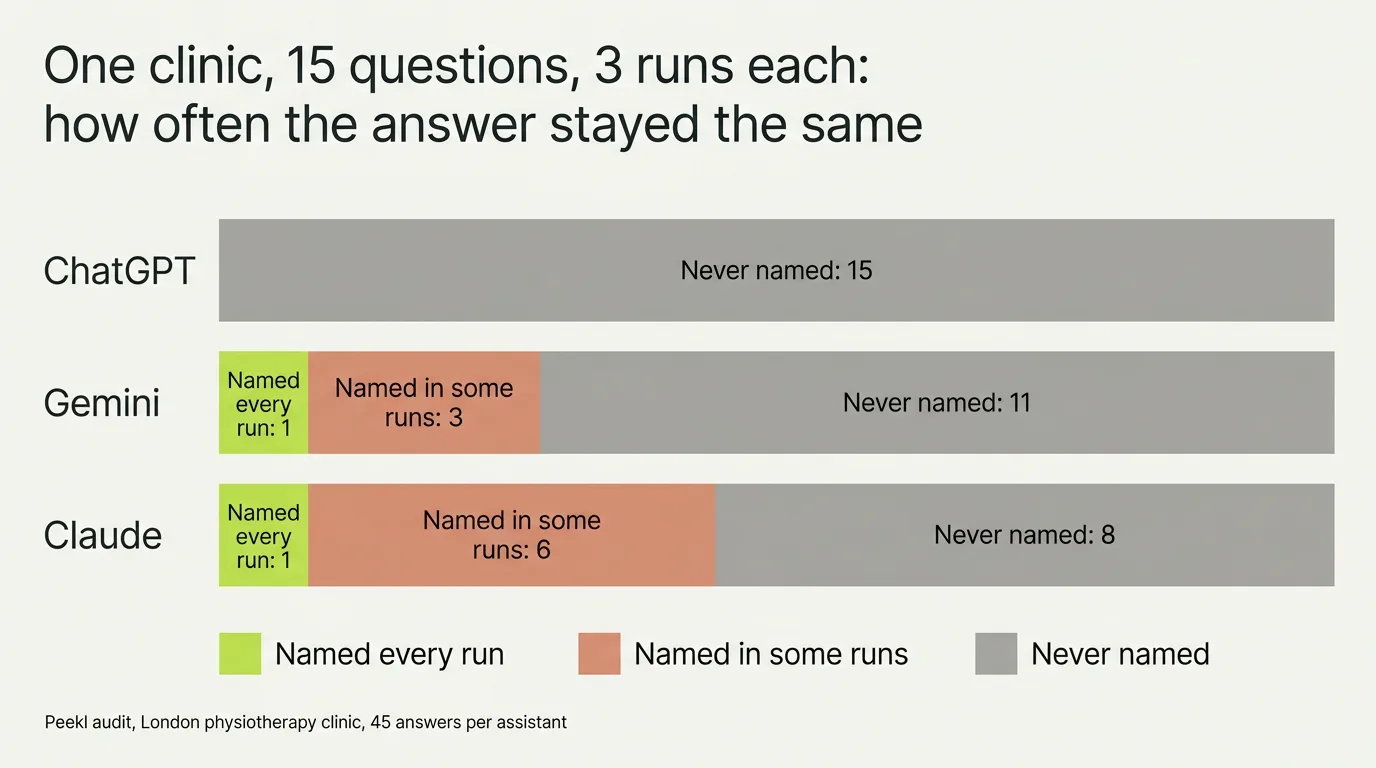
- One check tells you little. In a real Peekl audit, Gemini named a clinic for 4 of 15 questions at some point but for only 1 of them every time. Repetition is the measurement.
- The free Peekl check can run on ChatGPT: twelve customer questions, asked once. The $99 audit reads 45 ChatGPT answers plus Gemini and Claude and traces every recommendation to its source.
- No tool can force an assistant to recommend you, and no honest one promises a number-one spot. What you get is an accurate snapshot you can act on.
- To get named, get onto the pages ChatGPT reads: your trade's official register first, then Yelp in the US and the directories that rank for your customers' questions.
How to check if ChatGPT recommends your business, in five steps
The simplest way to check is to become your own customer for five minutes. Open ChatGPT and ask it the questions people ask when they are ready to buy, using your real trade and town. Read the answer and look for your name. Done properly, the by-hand version takes an afternoon rather than five minutes, and these five steps are the difference.
- “Best [your trade] in [your town]”
- “Who should I use for [the job you do] near [your area]?”
- “Recommend a reliable [your trade] in [your town]”
- “Who are the top-rated [your trade] in [your town]?”
- “I need [a specific service] in [your town] this week, who do you suggest?”
- Step 1: write down five questions. Start with the broad one, "best [your trade] in [your town]", then add a specific need, a "near me" phrasing, a budget or urgency phrasing, and a "who should I trust" phrasing. The examples below are a starting point.
- Step 2: set ChatGPT up like a customer. Open a new chat, or a temporary chat so your own history does not colour the answer, make sure web search is on, and never type your business name into the question. Ask the first question exactly as written.
- Step 3: score the answer in three columns: you were named, a competitor was named, or ChatGPT gave no names at all. Note the order you appeared in and copy the sentence it wrote about you. That sentence tells you what ChatGPT believes you are.
- Step 4: ask a follow-up, "Which websites did you use for that answer?" When ChatGPT has searched, it will list them. Write down every directory, review site and guide it names. Those pages are where the answer was decided, and they are what you will fix.
- Step 5: repeat each question three times, ideally across two days, then move to Gemini and Claude with the same five questions. Fifteen questions asked three times each is what the audit does; five questions three times each is the smallest check you should trust.
Score yourself: Yes or Not yet
Once your answers are in a spreadsheet, run them against this checklist. Count the Yes column. Five or six means you have a presence to defend. Three or four means the gaps are specific and fixable. Two or fewer means ChatGPT does not know you yet, and the work starts with the sources in step 4.
| Check | Yes | Not yet usually means |
|---|---|---|
| ChatGPT named you in at least half of your runs | You have a presence to defend | You are missing from the pages ChatGPT reads for your trade and town |
| It named you for a specific need, not only the broad question | Your services are described plainly somewhere it reads | Your listings say "plumber" while the customer asked for "boiler repair" |
| What it said about you was accurate | Your details agree across the web | An old address, stale hours or a closed listing is being quoted |
| The competitors it named are the ones you would expect | You are in the right pool | A directory-only or defunct business is beating you, so the source is stale |
| The websites it cited include you | You are one step from being named | Get listed on the exact pages it read, then re-check |
| Gemini or Claude also name you | Your presence is broad, not one lucky page | A single directory carries you and the others do not |
Why checking by hand is harder than it looks
Doing it by hand is honest and free, but it has real limits, and those limits are why a one-off look can mislead you.
AI answers change every time you ask, so a single check is closer to a coin flip than a measurement. We can put a number on that. In one full Peekl audit of an established London physiotherapy clinic, each of fifteen customer questions was put to three assistants three times. Gemini named the clinic at some point for 4 of the 15 questions, but for only 1 of them in all three runs. Claude named it for 7 questions, again only 1 of them every time. ChatGPT never named it in 45 answers. A single question, asked once, would have called most of those wrong in one direction or the other.
By hand you also cannot see where the answers come from. Assistants build their picks from directories, review sites and best-of lists, and knowing which source named your competitor is what tells you where to act. When ChatGPT cites the web it leans on a small set of those sources: in Profound's analysis of citations from August 2024 to June 2025, Wikipedia took 47.9% and Reddit 11.3% of ChatGPT's top-ten citation share. So it is worth knowing which ones name you, see which websites AI trusts and how to track the sources AI cites. A manual check hides all of that, and it will not show you how often rivals appear next to you. If checking by hand is not practical, our page on alternatives to an AI visibility tracker compares the other routes, from free checkers to a one-time audit.
Checking Gemini, Claude and Google AI Mode by hand, the same afternoon
The five steps work on every assistant, with three small differences. Gemini is signed in to a Google account, so use one that is not tied to your business, and tap the sources it shows under the answer rather than asking for them. Its picks lean on your Google Business Profile, which is why checking Gemini doubles as a check on your Google presence.
Claude needs web search switched on in its settings, and it will often ask where you are before it names anyone. Give it the town and score the answer as usual, with a fourth column for the times it declines to name a business at all, which Claude does more than the others.
Google AI Mode is the conversational tab inside Google Search. It runs on Gemini models and Google's business data but leans harder on Google Maps listings, so check it separately; see what Google AI Mode is. Perplexity works with the same five steps and shows its sources by default. For the local picture across all of them, read the local AI visibility guide.
The faster way: a ChatGPT visibility checker
If you would rather not spend the afternoon, Peekl does the same five steps at scale. The free check asks twelve customer questions once, on ChatGPT or Gemini, your pick, and shows who it named, which websites it cited and the first thing to fix. The full audit covers ChatGPT, Gemini and Claude: fifteen questions, three runs each, 45 ChatGPT answers read one by one, every competitor ranked by how often it was named, every source traced, and a ranked plan of fixes.
It is a snapshot, not a verdict. AI answers change, and no tool controls what an assistant says, so we report how often you appear rather than a single lucky or unlucky result. What you get is an honest read you can act on, without pasting anything by hand.
To show what this looks like, the clinic above was a real audit. Across ChatGPT, Gemini and Claude it was named in only 19 of 135 answers, and ChatGPT never named it once, while other clinics were recommended in its place. The owner had no way of knowing that until they measured it.
How to get your business recommended by ChatGPT
The check shows you the gap; closing it means getting onto the pages ChatGPT reads. That is a narrower job than it sounds, because ChatGPT builds a local answer from the few pages its search opens, 2.4 per answer in our scans, plus partner data such as Yelp in the US. These steps each put you on a page ChatGPT is likely to read.
The table after the steps comes from our own scans: 63 ChatGPT scans of seven trades in nine cities, run through the API with web search between 3 and 10 September 2026. Each number is how many of a country's scans had that site among ChatGPT's ten most-cited sources.
- Get onto the official register or professional body for your trade, and complete the listing; if your trade has none, as with most salons, start with the directories in the right-hand column of the table. Registers are ChatGPT's most distinctive habit: in our scans, more than one in four of its citations went to official and professional bodies, a kind of source Gemini barely used. The table below shows which ones by country.
- In the US, claim and complete your Yelp page. Yelp's shareholder letter of 6 August 2026 says its ratings and reviews "recently began powering ChatGPT's local experience". Yelp was among ChatGPT's top sources in only 1 of our 28 US scans, which ran through the API in early September, so treat it as one route among several.
- Be on the pages that come up for your customers' questions. OpenAI says ChatGPT search sometimes partners with other search providers and sends them rewritten, targeted queries (OpenAI), so the best-of lists, trade directories and local guides that rank for "best [trade] in [town]" are the pages it opens. Step 4 above tells you which ones.
- Name each service in the words customers use, on your site and on every listing: "boiler repair" or "emergency dentist", not only your trade. A page that answers the exact question gives ChatGPT the most to quote.
- Keep your name, address, phone number and hours identical on every page. With only 2.4 pages per answer in our scans, a mismatch on one of them leaves ChatGPT less to confirm. How AI decides which businesses to recommend explains the mechanics underneath.
- Allow OpenAI's search crawler. OpenAI says sites that allow OAI-SearchBot in robots.txt can appear in ChatGPT search results, and changes take about a day to apply (OpenAI crawlers).
| Country (scans) | Official and professional bodies ChatGPT cited (scans) | Directories and booking sites ChatGPT cited (scans) |
|---|---|---|
| United States (28) | American Academy of Dermatology (4, mostly aesthetic clinics), ChoosePT (4, physical therapists), American Dental Association Find-a-Dentist (3, dentists), MedlinePlus (3, physical therapists) | Birdeye reviews (5, several trades), Zillow (4, estate agents), Expertise.com (3, plumbers), BestInHood (3, hair salons) |
| United Kingdom (7) | NHS (4), Care Quality Commission (3) | Doctify (1), Checkatrade (1) |
| France (21) | ameli.fr (8), Haute Autorité de santé (5), economie.gouv.fr (4), Ordre des masseurs-kinésithérapeutes (3), Ordre des chirurgiens-dentistes (3) | PagesJaunes (8), Doctolib (5), Planity (3), Treatwell (3), MeilleursAgents (3) |
| United Arab Emirates, Dubai (7) | Dubai Health Authority (3) | Salons in Dubai (2), HomeGenie (1), Urban Company (1) |
Can you submit your business to ChatGPT?
No, there is no form. OpenAI says placement in ChatGPT search is not guaranteed and that a site becomes eligible when it lets OAI-SearchBot crawl it, with the host or CDN also allowing OpenAI's published IP addresses (OpenAI, read on 15 October 2026). ChatGPT search also works with third-party search providers; OpenAI names Bing for Enterprise and Edu accounts. So the nearest thing to submitting is making sure the pages can be crawled and are indexed.
- Allow OAI-SearchBot in robots.txt. OpenAI says sites that opt out are not shown in ChatGPT search answers, and changes take about 24 hours. GPTBot is a different bot, used for training: blocking it does not remove you from search (OpenAI crawlers).
- Get your pages into Bing. Submit them in Bing Webmaster Tools or through IndexNow, which Bing recommends for faster submission; neither guarantees indexing (Microsoft).
- Claim your free Bing Places listing, which shows in Bing search and Bing Maps (Microsoft). Microsoft does not say ChatGPT reads it, so treat it as a cheap listing on a search engine OpenAI works with, not a guaranteed route.
- In the US, keep your Yelp page complete: Yelp says its reviews power ChatGPT's local experience, as covered in the steps above.
What to do if ChatGPT still doesn't name you
Give it a few weeks and check again with the same questions, because the pages ChatGPT reads change on their own schedule. When the same competitor is named in your place again and again, why AI recommends your competitors shows how to compare yourself with it on the pages ChatGPT cited. You cannot buy your way into the answer: ChatGPT's ads sit below it, and OpenAI says they do not influence it (ChatGPT ads for local businesses).
For the levers that work across every assistant, read how to improve your visibility in AI search. If you would rather get a ranked plan made for your business, naming the exact competitors and sources to target, the full Peekl audit does the digging for you.
Common questions
Does ChatGPT recommend my business?
How can I check what ChatGPT says about my business?
How many times should I ask ChatGPT before I trust the answer?
Should I turn ChatGPT's web search on when I check?
Is there really a free tool to see if AI recommends my business?
Is there a ChatGPT visibility checker or tracker?
How do I find out if Gemini or Perplexity recommends my business too?
What if I'm not recommended?
How do I get my business recommended by ChatGPT?
See where you stand
Reading about AI search is useful; knowing your own place in it is what helps. A free Peekl check asks ChatGPT or Gemini, your pick, the questions your customers ask and shows whether it recommends you today, who it names instead, and how often. The full audit runs the same questions on all three assistants, Claude included.
More in this series: Measuring your AI visibility
- AI visibility metrics: how to measure your AI visibility (the KPIs that matter)
- How to check if Gemini recommends your business
- How to check if Claude recommends your business
- Why does AI recommend your competitors instead of you?
- How to track which sources AI cites, and whether they mention your business
Related reading
- Local AI visibility: what it is, and what the numbers say city by city
- The best ChatGPT rank trackers in 2026, compared
- How to improve your business's visibility in AI search
- Which websites does AI trust when it recommends a local business?
- Why isn't my business showing up in ChatGPT and other AI assistants?