How to check if Gemini recommends your business
Part of our series on Measuring your AI visibility. The reference guide is the guide to AI visibility metrics.
To check if Gemini recommends your business, open Gemini and ask the questions your customers ask, like the best option near them for what you do, then see whether your name appears. Because Gemini is Google's assistant, its answer leans heavily on your Google presence, so what you find points straight at what to fix.
If you would rather not do the asking yourself, the free Gemini visibility checker puts twelve customer questions to Gemini for you and reports who it named, which sites it cited and the first thing to fix. This guide is the by-hand method behind it: five steps, a self-score, and what Gemini's answer tells you about your Google Business Profile.
- Ask Gemini the real questions your customers ask, using your trade and town, and note whether it names you or a competitor.
- Gemini draws on Google's world: your Business Profile, Google reviews and Maps do more to shape its answer than they do on other assistants.
- Ranking on Google Maps is not the same as being named by Gemini. Gemini reads a shortlist back, and a strong map pin can still be left off it.
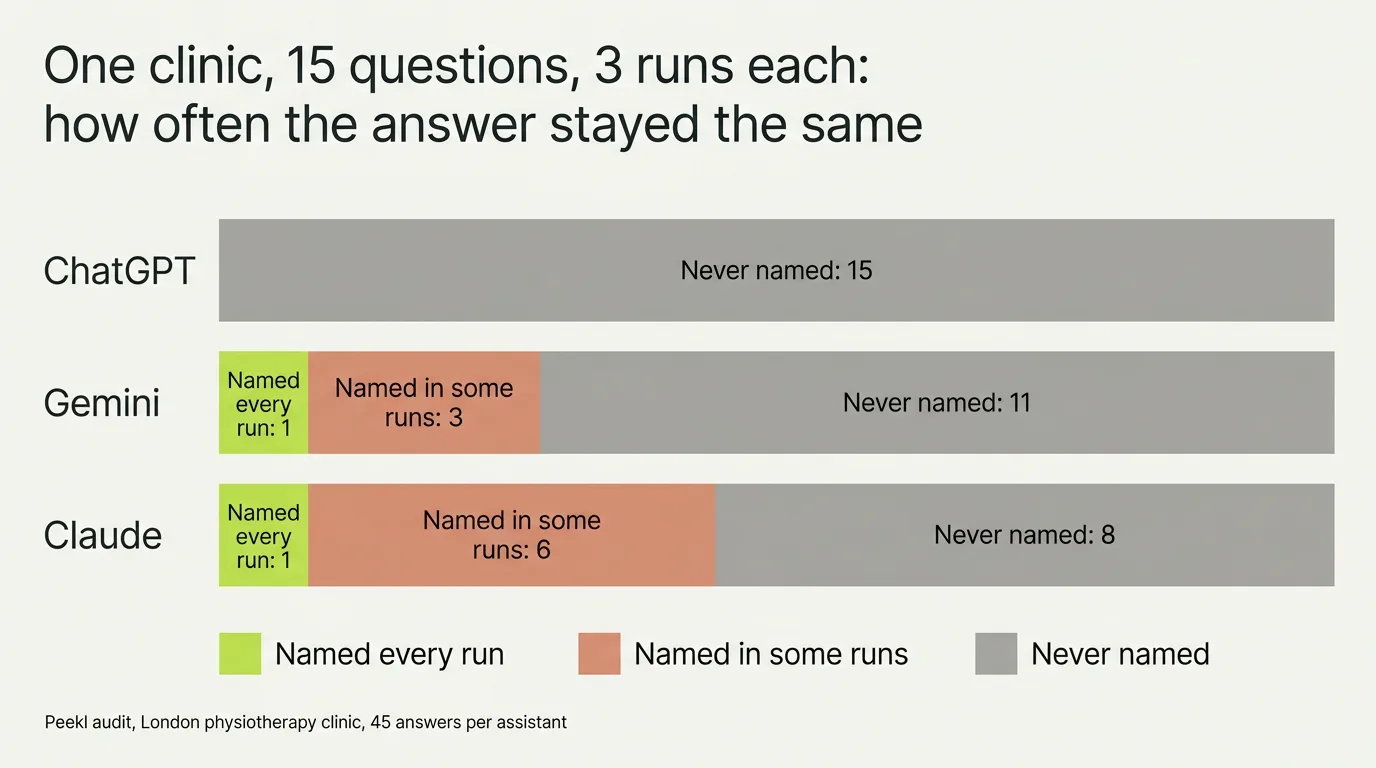
- Check more than once. When we put 15 questions to Gemini three times each for one clinic, a single question came back with the clinic's name on all three runs.
Where to check, and what to ask Gemini
Open Gemini, in the app or on the web, and become your own customer for a few minutes. Ask it the questions people ask when they are ready to choose, using your real trade and town, and read the answer for your name rather than for a general description of your industry.
Ask a few phrasings, because each pulls a slightly different shortlist. It is also worth glancing at the AI answer at the top of a normal Google search for the same question. It is a different product from Gemini, but it draws on many of the same Google signals, so the two often point the same way, and where they differ, that gap is worth noticing.
- “Best [your trade] near [your area]”
- “Who should I book for [the job you do] in [your town]?”
- “Recommend a well-reviewed [your trade] in [your town]”
- “Which [your trade] in [your town] has the best reviews?”
- “I need [a specific service] in [your town], who is open and good?”
The five-step Gemini check
A quick look tells you whether Gemini has heard of you. These five steps tell you how often it names you, who it prefers, and which Google signals decided it. Budget an hour.
- Step 1: choose five questions from the list above, mixing the broad "best near me" with a specific service and a time-pressure phrasing. Gemini uses your location when it knows it, so either set your location to your town or say the town in the question.
- Step 2: sign in with a Google account that has nothing to do with your business. Gemini can draw on your Google activity, and an account that has searched for your own company for years will not behave like a customer. Start a new chat for each question.
- Step 3: score the answer: named, competitor named, or no names. Note whether Gemini showed a map card or a place listing, and whose it was. That card is Google's Business Profile data being read aloud.
- Step 4: open the sources Gemini shows under its answer. It lists the pages it read, so you do not need to ask. Sort them into two piles: Google's own surfaces such as Maps and Business Profiles, and third-party directories or review sites. Each pile is fixed differently.
- Step 5: repeat each question three times, then put the same five to ChatGPT and Claude. If Gemini names you and the others do not, your Google presence is ahead of the rest of the web, which is common and worth knowing.
Score yourself: Yes or Not yet
With fifteen Gemini answers in front of you, work through this checklist. It is built around the Google signals Gemini reads, so a Not yet points at a specific field, listing or review pattern rather than at "do more SEO". To run the same questions on a schedule instead of by hand, the best Gemini rank trackers compares the tools that do it.
| Check | Yes | Not yet usually means |
|---|---|---|
| Gemini named you in at least half of your runs | Google's record of you is complete enough to quote | Your Business Profile is thin or your category does not match the question |
| The map card or place it showed was yours, not a rival's | Your Maps listing is the one Google associates with the query | A competitor's pin sits closer to the searcher or matches the category better |
| Its description matched your Business Profile | Your Profile, website and reviews say the same thing | Gemini quoted an old description or a review that contradicts your Profile |
| It named you for a specific service, not just the broad question | Your services are listed as services on your Profile | The service is on your website only, not in your Profile's services list |
| Your most recent Google review is under three months old | Google sees you as active | A quiet review trail reads as a dormant business |
| ChatGPT or Claude also name you | Your presence goes beyond Google | You live on Google alone and the wider web has never heard of you |
Why Gemini's answer is really your Google presence
Gemini is built by Google, and it reaches for Google's understanding of the world when it answers a local question. That means your Google Business Profile, your Google reviews and your place on Maps carry more weight in Gemini's answer than they do when you ask ChatGPT or Claude the same thing.
This is the useful part. Where some assistants pull from a wide, unpredictable mix of directories, Gemini's picks are anchored in a place you can actually see and edit. If your Business Profile is thin, your categories are wrong or your reviews have gone quiet, that shows up in Gemini first, and it is fixable without guesswork.
It also shows up in the numbers. SOCi's 2026 Local Visibility Index measured more than 350,000 locations and found Gemini recommended about 11% of them, against 1.2% on ChatGPT and 7.4% on Perplexity. Gemini is the assistant most likely to know a local business exists, precisely because it reads Google's record of it.
What moves your visibility in Gemini
Because Gemini leans on Google, the work that improves your Gemini answer is the work that strengthens your Google presence. These are the signals that matter most, and what to do about each. Google's own guidance on how local ranking works names relevance, distance and prominence, and Gemini inherits the same record. For the fuller method beyond Google, see how to improve your AI search visibility.
| Signal | Why Gemini leans on it | What to do |
|---|---|---|
| Google Business Profile | It is Google's primary record of who you are and what you do | Claim it, fill every field, and pick the most specific categories |
| Google reviews | A recent, genuine trail tells Google you are active and trusted | Ask happy customers to review you, and keep them coming |
| Consistent details | Matching name, address and phone let Google trust the match | Make your details identical on your site, your Profile and directories |
| Maps presence | Being on the map for your area and service puts you in the pool | Confirm your location, service area and hours are right |
How to get your business recommended by Gemini
Checking tells you where you stand. Getting named is a separate job, and with Gemini it is unusually concrete, because Gemini answers from Google's record of your business. Work through these in order; each one strengthens what Gemini reads before it decides who to name.
- Pick the most specific Google Business Profile categories you honestly qualify for, and fill every field. Gemini matches a customer's question to categories and services first.
- State on your own website, in plain words, what you do and where: the service, the area, the hours. Gemini cross-checks your site against your Profile and skips businesses whose details conflict.
- Build a steady trail of recent, genuine Google reviews that mention the service and the place. Volume, recency and specificity all raise Gemini's confidence in naming you.
- Get listed on the local directories and review sites Google already trusts for your trade. Being confirmed in more than one place is what turns a listing into a recommendation.
- Then ask Gemini your customers' questions again after four to six weeks, several times. A rising share of answers that name you is the signal it worked; one answer is not.
- None of this guarantees a spot, and no tool can. Because Gemini and Google AI Mode share the same signals, this work also lifts you in Google AI Mode; for the full method across every assistant, see how to improve your AI search visibility.
Why ranking on Google isn't the same as being named
It is easy to assume that a good spot on Google Maps means Gemini will name you. It does not follow. A search page can list a dozen businesses, but Gemini reads back a short answer with only a few, and being in the wider list is not the same as making that shortlist.
We have seen this exact gap in a real check: in one Peekl audit, an established clinic that ranked well on Google was named by Gemini in only 6 of 45 answers to the questions its own customers would ask. Those six were spread across 4 of the 15 questions, and only one question produced the clinic's name on all three runs. So you can be findable on Google and still be missing from Gemini's spoken answer, which is the one a customer now acts on. For what shapes the pick underneath, see how AI decides which businesses to recommend; for how far the assistants diverge, see do ChatGPT, Gemini and Claude recommend the same businesses.
Checking ChatGPT, Claude and Google AI Mode alongside Gemini
A business Gemini names is often invisible elsewhere, because the other assistants do not read Google's record of you. Run the same five questions through ChatGPT, asking it which websites it used, and through Claude with web search on. Google AI Mode, the conversational tab inside Google Search, shares Gemini's signals, so your Gemini result is the closest reading of it; pick Gemini in the free Peekl check for that reason, and the full audit covers ChatGPT, Gemini and Claude. The local AI visibility guide puts all of this in the context of your town.
Common questions
Does Gemini use my Google Business Profile and reviews?
I rank on Google Maps but Gemini doesn't name me. Why?
Does Gemini's answer depend on which Google account is signed in?
How many times should I ask Gemini before I trust the result?
Is checking Gemini different from checking ChatGPT?
How do I get my business recommended by Gemini?
Can Gemini recommend companies and local businesses?
How often does Gemini's answer change?
Should I check Gemini once, or keep monitoring it?
See where you stand
Reading about AI search is useful; knowing your own place in it is what helps. A free Peekl check asks ChatGPT or Gemini, your pick, the questions your customers ask and shows whether it recommends you today, who it names instead, and how often. The full audit runs the same questions on all three assistants, Claude included.
More in this series: Measuring your AI visibility
- AI visibility metrics: how to measure your AI visibility (the KPIs that matter)
- How to check if ChatGPT recommends your business
- How to check if Claude recommends your business
- How to track which sources AI cites, and whether they mention your business