ChatGPT Business Hub: can your business claim its listing?
Part of our series on Improving your AI visibility. The reference guide is the guide to improving your AI search visibility.
Since 10 November 2026, yes, if you qualify. OpenAI's new Business Hub lets a business claim its listing in ChatGPT, correct its details and see 28 days of mentions and website clicks. Local stores and restaurants can only claim an existing US listing for now, and OpenAI says claiming does not make ChatGPT recommend you more.
This article covers what OpenAI launched, who can claim today and how the claim works. It then compares the insights with Google Search Console, flags what to read in the terms before you accept, and sets out what a local business outside the US can do in the meantime. Every rule below comes from OpenAI's own announcement, help article, terms and policies, read on 11 November 2026, the day after launch.
- You do not need an ads account or a ChatGPT Enterprise plan to claim a business. You need a ChatGPT account, authority to represent the business and an identity check with Persona.
- Local stores and restaurants can only claim a listing that already exists in the US. A plumber in Paris or a café in London cannot claim yet; online businesses can claim in more countries.
- Insights cover the past 28 days: mentions, website clicks and discovery topics. You never see the questions people asked, your position, or who was named instead of you.
- OpenAI says claiming does not change your visibility. Your listing can still draw on other sources, and a published profile cannot be deleted.
- Read the terms first: they let ChatGPT's assistant phone your business for customers (you can opt out), give OpenAI a permanent licence to your basic details, and in section 10 have you give up claims against OpenAI over the data you submit and the content on your websites.
What did OpenAI launch on 10 November 2026?
Two products, both in beta. Businesses in ChatGPT is a profile a business can claim and manage through Business Hub, a new item in the ChatGPT sidebar. Business Agents are chat assistants a business can publish on that profile, starting with "eligible ecommerce and online service businesses in the U.S." (OpenAI). OpenAI pitches it as a way to reach "the 1.2 billion people who use ChatGPT each week", its own figure.
In practice, when ChatGPT names a business in an answer, people can click through to that business's ChatGPT profile. Once the owner's identity is verified, the profile shows a blue check. Retailers can add a product feed with prices and stock, and any business with an agent can sponsor it as the destination of a ChatGPT ad.
For a local business, the claim and the insights are what matter today. Agents and product feeds are built for online sellers, and no local trade can publish an agent yet.
Can a local business claim its ChatGPT listing?
In the US, if ChatGPT already lists it. Elsewhere, not yet. OpenAI's help article says "Local stores and restaurants can currently claim only an existing U.S. listing" (OpenAI Help). Online businesses can claim or add a profile wherever ChatGPT is available and OpenAI supports the verification. The claim page says claiming is "initially available to eligible businesses with a website".
Category matters too. OpenAI's Businesses in ChatGPT policy says it may "hold off on allowing businesses in other categories" until it has the safeguards it needs, without listing which. Where you stand today:
| Your business | Can you claim it today? | Can you publish a Business Agent? |
|---|---|---|
| Local shop, restaurant or trade in the US that ChatGPT already lists | Yes, through Business Hub | No, agents start with ecommerce and online services |
| Local business in the US that ChatGPT does not list yet | Not yet: a local business cannot add a new listing | No |
| Local business in France, the UK, the UAE or elsewhere | Not yet, even if ChatGPT already names you | No |
| Online shop or online service in the US | Yes, claim or add your business | Yes, if your industry qualifies |
| Online business outside the US | Yes, where ChatGPT is available and the verification is supported | Not yet |
| Business without a website | Not at first: OpenAI starts with businesses that have one | No |
How do you claim your business in ChatGPT?
In five steps, and the last one asks for ID. You need a ChatGPT account and the authority to represent the business; OpenAI's help article sets out the steps.
- Open Business Hub from the ChatGPT sidebar and search for your business by name.
- Pick the listing that matches yours and confirm the ChatGPT account that will manage it.
- Verify the claim with one of the methods offered: a code sent by text or automated call to the business phone, a code sent to the business email, a TXT record added to your domain's DNS, or a Shopify login.
- Wait for OpenAI's decision by email. You can cancel the claim while it is under review.
- Complete identity verification with Persona. You may need a government-issued ID, business registration details and proof that you represent the business. Until Persona approves you, you cannot publish changes, see insights or create an agent.
What if someone else claimed it, or you have several locations?
If your business is already claimed, open its profile, choose "Dispute ownership" from the menu and verify with Persona that you are authorised to represent it. A listing showing "Contact support" is locked; ask OpenAI Support for access.
Multi-location businesses get no shortcut. Each brand is managed separately, central management across brands and locations is not available, and "Claiming the main brand doesn't claim its locations". A franchise or a group with several branches claims each location on its own, or goes through an OpenAI account representative if it has one.
Agencies can help without taking over the account. The admin who claimed the business can add teammates and give an agency access to the profile or the agent, each person using their own ChatGPT account. OpenAI asks owners not to forward a personal claim invitation.
What can you change on your ChatGPT business profile?
Once both checks are approved, you can edit your website, business description, category, logo, delivery policy and return policy, and add a cover photo and other optional details. OpenAI's policy asks that your name, category, address or service area, hours, contact details and services stay accurate. Each change is reviewed before it is published, and OpenAI warns that "ChatGPT may also use other sources when answering questions about your business".
So the profile is one source among several, not a control panel. The terms say claiming "does not give you exclusive control" over the listing, and that OpenAI may "supplement, edit, or replace information using other sources". If ChatGPT gets your hours or prices wrong, fix the profile and the pages it reads; what to do when AI gets your business wrong covers the second part.
Is Business Hub the Search Console of ChatGPT?
Partly. Like Google Search Console, it shows how often you appeared and how often people clicked through to your site. Unlike it, it hides the questions, covers only 28 days and gives no position. For a local business, OpenAI counts a mention "when ChatGPT shows a result for that location, even if the customer doesn't open the listing or visit the website": closer to an impression than to a recommendation you can read.
"Discovery topics", the third metric, groups the themes of answers that mentioned or cited you. OpenAI says they "don't reveal individual prompts or directly measure customer intent". Here is how the two dashboards compare:
| Google Search Console | ChatGPT Business Hub | |
|---|---|---|
| What it counts | Impressions and clicks in Google Search | Mentions (for a local business, each time ChatGPT shows a result for your location) and website clicks |
| Time window | Up to 16 months (Google) | The past 28 days |
| The questions people asked | Search queries, minus rare ones hidden for privacy (Google) | Not shown; discovery topics group themes instead |
| Your position | Average position per query and page | None |
| Who was shown instead of you | No | No |
| Which pages the answer relied on | Not applicable | No |
| Small numbers | Rare queries are left out of the query table but still counted in the totals | A blank metric may only mean activity is below OpenAI's reporting threshold, not zero |
What does a mention count leave out?
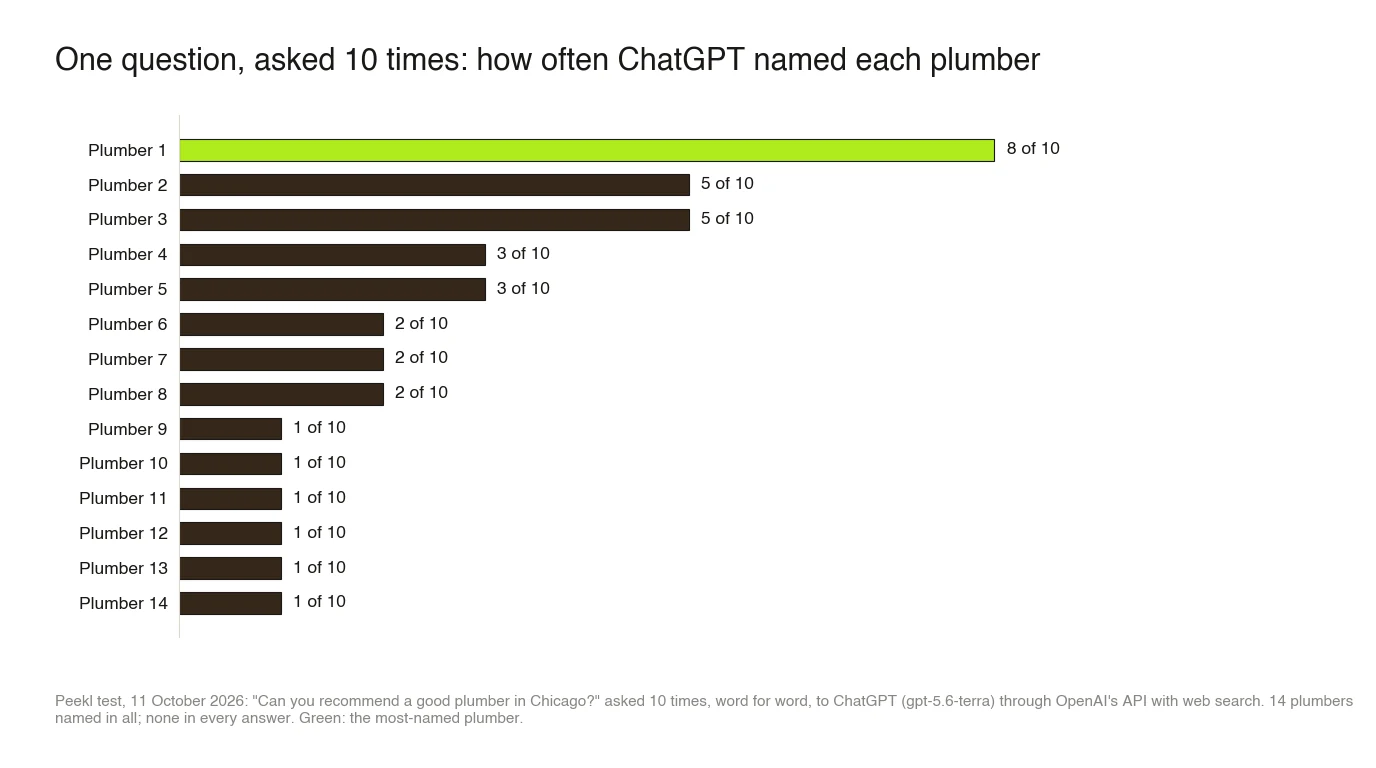
How much the answer moves. A month of mentions adds up answers that change every time they are asked. One question in one city shows the scale: in our repeat test on 11 October 2026, we asked ChatGPT "Can you recommend a good plumber in Chicago?" 10 times, word for word. It named 14 different plumbers. The most-named came up in 8 of the 10 answers, two others in 5, and six plumbers appeared only once.
So a mention count can move with chance as well as with your work, and a business named in one answer out of ten still collects mentions. What it cannot show is why: who was named when you were not, and which pages the answer read. Those pages are rarely the ones a profile edit touches. Across our September city scans (378 ChatGPT answers, seven trades, nine cities), 27% of the sources ChatGPT cited were licensing boards, trade registers and other official bodies.
Does claiming your business help ChatGPT recommend you?
Not directly, and OpenAI says so. Its help article states that claiming "doesn't guarantee increased visibility or give you direct control over ChatGPT's independent recommendations". It adds that "Claiming a profile or disputing ownership doesn't change its visibility in ChatGPT". The terms add that OpenAI does not guarantee "any particular placement, ranking, visibility". Ads do not change the answer either; ChatGPT ads for local businesses explains what an ad buys.
What a claim can do is keep the details ChatGPT shows correct. That has value: a wrong phone number or a listing that says you close on Mondays costs customers even when you are named. Whether you are named still depends on what ChatGPT reads. In the US that includes Yelp, which told shareholders in August 2026 that its ratings and reviews "recently began powering ChatGPT's local experience". Everywhere, it includes your own website, if you let OpenAI's search crawler, OAI-SearchBot, read it (OpenAI).
What should you read in the terms before you accept?
Four clauses in the Businesses in ChatGPT Terms, last updated on 9 November 2026, deserve a careful read. We are not lawyers; take advice if any of them worries you.
- Phone calls from ChatGPT. Section 4.1 says "By using Business Hub, you agree OpenAI's AI assistant may make calls to you on behalf of our users", for example to ask about opening hours or make a reservation. OpenAI has a form to stop these calls to a business number.
- A permanent licence to your basic details. Section 4.2 makes OpenAI's licence "perpetual and irrevocable" for the name, address, contact details, category, opening hours and website you submit for public display.
- No exclusive control, and no delete button. OpenAI "may create, maintain, and display a business listing" whether or not you claim it, and the help article says Support cannot delete, unpublish or hide a published profile. Only an unpublished draft can be deleted.
- A promise not to sue. In section 10 you agree, "irrevocably and perpetually", not to bring claims against OpenAI over the data you submit or the content published on your own websites, and you release such claims. If you care how your website content is used, read this clause twice.
Can a local business get a Business Agent?
Not yet. Agents are open to eligible ecommerce and online service businesses in the US with a website, and OpenAI reviews both the category and the agent's intended use before it goes live. An agent answers questions about your products and policies from information you provide, and links to your website. It cannot take a booking, complete a purchase or check an order. Its chat is labelled and kept separate from ChatGPT's own answer.
The Business Agents policy also limits what an agent may say: it must make clear it is an AI representing the business, and it "must not provide users with advice that legally requires a professional license". That rules out much of what a clinic or a law firm would want one to do. A business can sponsor its agent as the destination of a ChatGPT ad, but that is still an ad below the answer, not a place in it.
What should local businesses outside the US do now?
Prepare the parts that do not need Business Hub, so you are ready when it reaches you. OpenAI says it plans to expand "to more markets and business categories" over time, without dates.
- Let OAI-SearchBot read your website, and keep your name, address, phone number and hours identical everywhere they appear, since those are the details a future profile will show.
- Get onto the listings ChatGPT reads for your trade: Yelp in the US, and elsewhere the directories and registers that come up for your customers' questions. How AI decides which businesses to recommend explains which.
- Decide whether you want ChatGPT to phone your business. If not, the stop-calls form works without a claim.
- Measure where you stand today, by hand with five questions asked three times or with a free Peekl check, so you have a baseline before any profile exists. Business Hub will tell you how often you were shown; a check also shows who was named instead and which websites the answers used.
How we checked this article
The Peekl team read OpenAI's announcement of 10 November 2026, its help article "Setting up your business on ChatGPT", the Businesses in ChatGPT Terms (updated 9 November), the Businesses in ChatGPT policy and the Business Agents policy (both updated 10 November), the claim page and the stop-calls page on 11 November 2026. The figures on how answers vary come from Peekl's repeat test of 11 October 2026, run through OpenAI's API with web search, and the citation share from our September city scans. We are claiming Peekl's own profile in Business Hub and will add what the steps and insights look like once it is approved. Businesses in ChatGPT is a beta that OpenAI plans to widen, so we will update this page as eligibility changes.
Common questions
Is claiming a business in ChatGPT free?
Can I claim my business in ChatGPT from France or the UK?
Where is Business Hub in ChatGPT?
Can I remove my business from ChatGPT?
Why are my Business Hub insights blank?
Does Business Hub replace my Google Business Profile?
See where you stand
Reading about AI search is useful; knowing your own place in it is what helps. A free Peekl check asks ChatGPT or Gemini, your pick, the questions your customers ask and shows whether it recommends you today, who it names instead, and how often. The full audit runs the same questions on all three assistants, Claude included.
More in this series: Improving your AI visibility
- How to improve your business's visibility in AI search
- Generative engine optimization for a local business: what to do first
- AI search optimization services: what agencies charge, what they deliver, and when to do it yourself
- How to appear in Google's AI Overviews
- Does Google Business Profile affect ChatGPT and Gemini recommendations?
- Just opened, moved or renamed: how long until ChatGPT and Gemini know your business?
- ChatGPT or Gemini has the wrong hours, phone number or details for your business: why, and how to fix it
- ChatGPT ads: can a local business pay to be recommended?